Email is essential to doing business, but it is also one of the ways cybercriminals attempt to reach employees.
For businesses in Dallas, Austin, San Marcos, and across Texas, knowing how to recognize a suspicious email can help prevent a simple click from turning into a much larger cybersecurity incident.
The challenge? Phishing emails don't always look obviously fake.
They may appear to come from a company you recognize, a vendor you work with, or even someone inside your organization. Before clicking a link, opening an attachment, sending money, or providing sensitive information, take a closer look.
1. Check the Actual Email Address
Don't rely solely on the sender's display name.
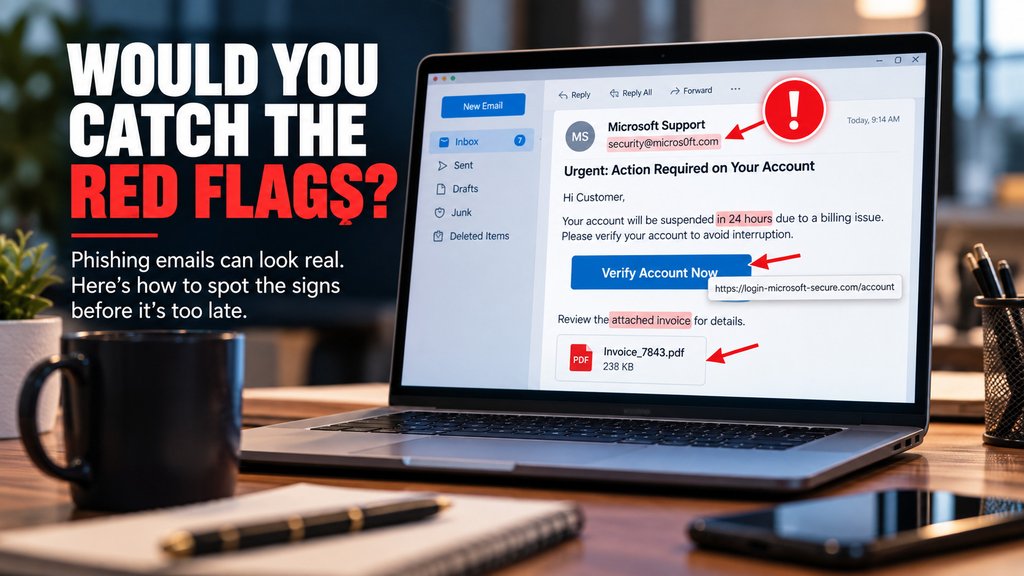
Attackers can create email addresses and domains that look similar to legitimate ones. Sometimes the difference may be a single letter, number, or character.
For example, a fraudulent domain might replace the letter "o" with the number "0" to make an address look legitimate at first glance.
What to do: Expand the sender information and carefully inspect the complete email address and domain before responding or taking action.
2. Watch for Unexpected Urgency
Be cautious when an unexpected email pressures you to act immediately.
That might include requests to:
- Make an urgent payment
- Change banking information
- Verify an account
- Reset a password
- Purchase gift cards
- Open an unexpected attachment
- Click a link to prevent an account from being suspended
Urgency alone doesn't mean an email is fraudulent. However, creating a sense of urgency is a known phishing technique because it can encourage someone to act before verifying the request.
Slow down before you click.
3. Inspect Links Before Clicking
The words displayed on a button or hyperlink don't necessarily tell you where that link will actually take you.
A button might say "Review Document," "View Invoice," or "Verify Account" while directing you somewhere completely different.
On a computer, hover over the link without clicking it and look at the destination.
Does the domain match the organization that supposedly sent the email?
If you're unsure, don't use the link provided in the message. Instead, navigate directly to the company's known website or contact the organization using information you already trust.
4. Be Careful With Unexpected Attachments
Invoices, PDFs, spreadsheets, shared documents, and other attachments are part of everyday business communication. That makes them useful disguises for phishing attempts.
An unexpected attachment deserves additional scrutiny, even when the sender appears familiar.
If you weren't expecting the file, verify it with the sender through another trusted communication method before opening it.
5. Question Unexpected Requests for Sensitive Information
Take extra care when an unexpected email requests:
- Passwords or login credentials
- Banking information
- Credit card information
- Personal information
- Account verification
- Payment information
- Other confidential business information
Phishing attacks can direct users to fraudulent websites designed to capture credentials and other sensitive information.
If a request seems unusual, verify it independently before providing anything.
6. Always Verify Changes to Payment Instructions
This is particularly important for businesses.
If a vendor, executive, client, title company, or other trusted contact suddenly emails new payment or wiring instructions, don't rely solely on that email to verify the change.
Contact the person or organization through a separate, trusted communication method before sending money.
The FBI specifically recommends verifying changes in account numbers or payment procedures directly with the person making the request.
Phishing Can Look Surprisingly Normal
One of the biggest misconceptions about phishing is that every malicious email will contain obvious spelling mistakes, strange formatting, or ridiculous requests.
That's not always the case.
The FBI has documented Business Email Compromise schemes involving criminals impersonating trusted sources. Examples include fraudulent requests that appeared to involve vendors changing payment information, executives requesting gift card purchases, and title companies providing wiring instructions.
That's why employees shouldn't rely on appearance alone.
A professional-looking email can still be dangerous.
When in Doubt: STOP. CHECK. VERIFY.
STOP
Don't immediately click, download, reply, provide information, or send money.
CHECK
Look carefully at the sender's email address, links, attachments, wording, and the request being made.
VERIFY
Contact the person or organization through a phone number, website, or communication method you already know is legitimate.
That extra verification can be the difference between identifying a phishing attempt and dealing with a cybersecurity incident.
Is Your Business Prepared for the Email That Looks Real?
Your employees shouldn't have to be cybersecurity experts to recognize when something doesn't look right.
Torch Networks helps businesses in Dallas, Austin, San Marcos, and throughout Texas strengthen their cybersecurity, protect their technology, and identify potential security gaps before they become larger problems.
From cybersecurity and managed IT to proactive monitoring, backup and recovery, and strategic technology guidance, Torch Networks provides businesses with experienced IT professionals and responsive support.
Protect your business before the next suspicious email hits someone's inbox.
Visit www.torchnetworks.com to learn more or schedule a discovery call with Torch Networks.